![SUST-Logo-Full_Black (2) (1).png]](https://knowledgebase.sustainment.tech/hs-fs/hubfs/SUST-Logo-Full_Black%20(2)%20(1).png?height=40&name=SUST-Logo-Full_Black%20(2)%20(1).png)
Standardizing your supplier approval process
In the fast-paced environment of manufacturing, every second counts. That’s why companies like yours use Sustainment to organize their supplier approval process, allowing all parties in the organization to see which vendors are approved and where not yet approved vendors are in the onboarding process. With Sustainment’s fully customizable “Lists” feature, companies can bring their own process to life in a manageable system that offers greater company-wide visibility with the added benefits of built-in certification and NDA management.
The typical supplier onboarding process has several steps, including an initial evaluation, qualification, and approval. Each step may be broken down further into smaller steps from there. Every supplier onboarded moves through each step as they are brought into a buying teams’ network. Tracking where suppliers are in the process is a largely manual task, oftentimes relying on spreadsheets and email chains.
Using Sustainment in your process
Using Sustainment’s Lists enables quick, easy tracking of suppliers through the onboarding process and gives the entire team visibility to where each supplier is in the process. Pair the “Notes” feature with Lists, and Sustainment offers a comprehensive solution for internal transparency and collaboration. Messaging with the suppliers through Sustainment keeps all communication, certifications, and tracking in one place.
Example onboarding process using Lists
An onboarding process may look something like:
- Research List (compiled with input from anyone in the organization)
- Review List (companies that make it into the review list have the desired certifications, credible reputation and service record, and are ready for a more in-depth review of company records, credit history, and compliance assessment)
- Audit Certifications (audit quality system to ensure documented processes are as expected and desired)
- Onsite Audit (onsite audit to verify quality systems are in place as documented)
- Approved Vendors List (passed all audits, understands expectations, and approved to perform work)
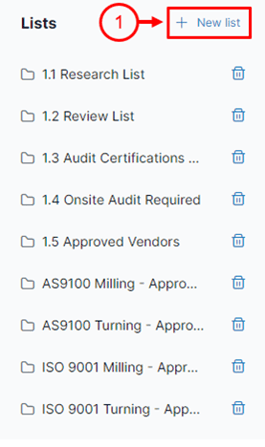
Get started today by going to “My suppliers” and selecting “+ New list” (1) to begin organizing your suppliers.
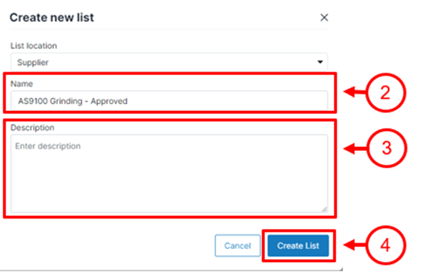
Type your desired list name (2) and description (3) then select “Create List” (4).
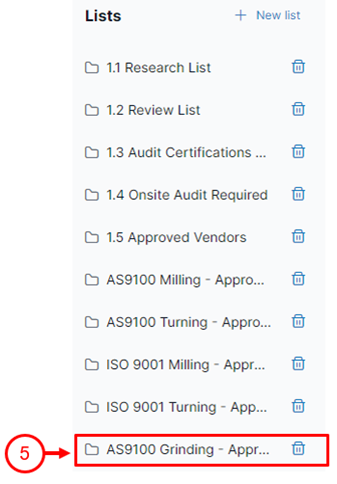
The new list appears at the bottom of your existing lists (5) until your browser refreshes, at which point the new list will sort alphabetically with the others.
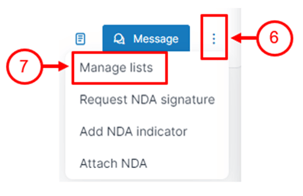
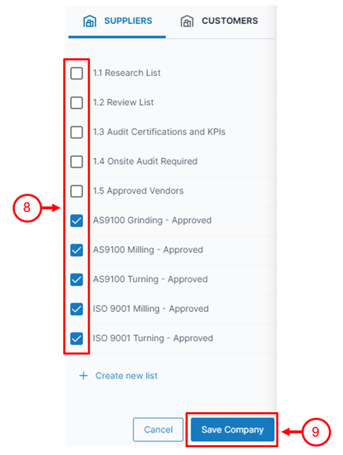
To add or remove companies from lists, select the ellipses (6) on the right side of the company card in “My suppliers,” select “Manage lists,” check all appropriate boxes (8) to remove or add a company to a list or multiple lists, then “Save Company” (9) to update which lists the company is a part of.
With the addition of company Lists, anyone on your company’s Sustainment profile has visibility to where vendors are in the approval process and who your approved vendors are.